
Performance Can Drift
Luminance, black level, grayscale response, uniformity, and environmental conditions can change over time.
Diagnostic monitor calibration failures can indicate a display, sensor, software, environmental, or documentation problem. This guide explains what a failed check means, the risks that deserve attention, and how an imaging facility can respond without confusing technical troubleshooting with clinical quality assurance.
Luminance, black level, grayscale response, uniformity, and environmental conditions can change over time.
A result is more useful when the facility can trace the display, test method, target, operator, date, and corrective action.
Technical support can isolate the cause, but the facility’s approved QA process determines return to diagnostic use.
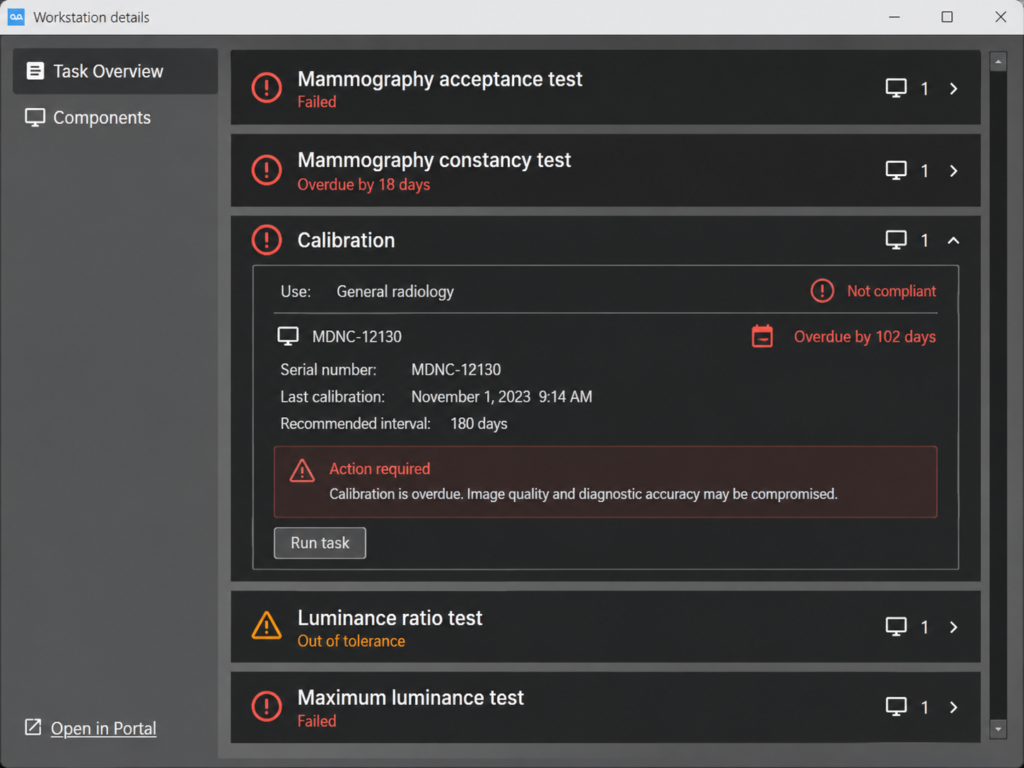
A diagnostic display converts image values into visible luminance. For grayscale imaging, DICOM PS3.14 defines the Grayscale Standard Display Function (GSDF), a standardized relationship intended to support consistent grayscale presentation. Calibration adjusts a display system toward a defined target; quality control checks whether the system continues to perform within the applicable program’s limits.
A failed result does not identify one universal cause. It may reflect genuine display drift, an integrated or external sensor problem, changed ambient light, incorrect software communication, a graphics-driver or profile change, a test performed under the wrong conditions, or a documentation issue. The first task is to determine which part of that chain failed.
The display may no longer reach or hold the approved targets used by the facility’s QA program.
Measured response may deviate from the selected GSDF conformance criteria or approved baseline.
Brightness differences, stuck pixels, image retention, noise, or visible artifacts may require separate evaluation.
The monitor may be healthy while the sensor, service, USB path, network agent, profile, or management software is not.
Some failures are obvious and others are only visible in the QA record. These seven signs should trigger the facility’s approved review and escalation process.
The management software reports a failed test, an overdue task, an interrupted run, or a result that never reached the central record.
Repeated correction is required, warm-up behavior is unstable, or measured luminance continues to fall outside the approved range.
The response curve or contrast behavior no longer meets the criteria defined by the facility, manufacturer, or applicable QA program.
One part of the screen looks brighter, darker, tinted, noisy, retained, or otherwise different from the approved baseline.
New lighting, reflections, open shades, a relocated workstation, or a different viewing position can alter the effective reading environment.
An operating-system update, graphics-driver change, swapped cable, new GPU output, KVM, or replacement display can invalidate the expected configuration.
A monitor may appear normal but still present an operational risk when the facility cannot verify its baseline, test history, corrective action, or return-to-service decision.
Do not treat a successful software rerun as automatic clinical clearance. If calibration status or display performance is uncertain, follow the facility’s approved policy, use an authorized alternate station when required, and obtain the appropriate QA or medical-physics review before returning the display to diagnostic use.
DICOM GSDF calibration is one element of display performance. A complete QA program may also address luminance, contrast response, uniformity, pixel defects, artifacts, ambient illumination, viewing conditions, measurement tools, recordkeeping, acceptance testing, and change control. AAPM Report 270 provides modern display-QA guidance for flat-panel displays used in medical imaging.
Mammography has additional regulatory and accreditation responsibilities. The FDA MQSA program establishes federal quality standards for mammography facilities, while the ACR Digital Mammography QC Manual resources describe a structured QC program. Facilities should use the requirements and manuals that apply to their equipment, modality, accreditation, jurisdiction, and approved procedures.
| Reference or program | What it addresses | Practical facility action |
|---|---|---|
| DICOM PS3.14 | A standardized grayscale display function and methods for measuring or adjusting display-system response. | Define how GSDF calibration and conformance are implemented in the approved display workflow. |
| AAPM display-QA guidance | QA concepts, display categories, test methods, performance evaluation, and program design. | Build a documented program appropriate to the display’s intended use and risk. |
| FDA MQSA and ACR mammography QC | Mammography-specific regulatory, accreditation, equipment, testing, and documentation responsibilities. | Follow the applicable approved manual and qualified-person responsibilities for the facility and equipment. |
| Manufacturer and facility procedures | Model-specific sensors, software, target settings, workflows, intervals, tolerances, and service instructions. | Use the approved procedure and record any authorized deviation, repair, or replacement. |
Important distinction: general technical information is not a substitute for a facility’s regulatory, accreditation, clinical, legal, or medical-physics guidance. Requirements vary by modality, intended use, equipment, program, and jurisdiction.
A structured response protects the reading workflow and produces a useful record. The exact sequence must follow the facility’s policy, but these five steps help organize the investigation.
Follow the facility’s policy for pausing use, labeling the display, moving to an approved alternate station, and notifying the responsible person.
Record the display ID, workstation, date, test name, target, measured result, software message, operator, room condition, and recent changes without including PHI.
Review ambient light, warm-up state, sensor placement, USB or network communication, services, profiles, graphics drivers, cables, outputs, and visible screen condition.
Rerun, recalibrate, restore a qualified configuration, update approved software, repair communication, or escalate for measurement, service, or replacement as the procedure requires.
Complete the required post-correction test, record the result and corrective action, and obtain the approval required by the facility’s QA program.
Privacy reminder: do not place patient information, passwords, remote-access codes, or screenshots containing PHI in a public website form. Use the organization’s approved secure process for technical access and records.
There is no responsible one-size-fits-all interval for every diagnostic display. Frequency depends on intended use, modality, regulatory and accreditation requirements, the approved manufacturer or facility QC manual, display technology, measurement method, prior performance, and changes to the workstation or room. The correct schedule is the one formally adopted for that environment—not a generic web checklist.
A strong program combines routine user observations with scheduled quantitative testing, event-based testing after relevant changes, and a documented escalation path. It should clearly identify who performs each task and who can authorize the display for clinical use.
Centralized tools such as Barco QAWeb, EIZO RadiCS or RadiNET Pro, and LG display-management software can help schedule tasks, collect results, and identify communication problems. They still need correct configuration, reliable sensors and connectivity, responsible review, and a facility process for acting on exceptions.
Remote assistance can shorten the investigation when the workstation is accessible and the customer authorizes a secure connection. It is especially useful for determining whether the failure is caused by software, communication, configuration, or a likely physical display problem.
QA software services and communication, monitor detection, profiles, qualified graphics drivers, display order and resolution, logs, approved target settings, scheduling, and vendor escalation evidence.
Clinical acceptance, regulatory interpretation, medical-physicist duties, measurements that require on-site instruments, physical repair, formal accreditation records, and authorization to return a display to diagnostic use.
| Situation | Recommended path | Useful information |
|---|---|---|
| Software cannot see the display or sensor | Request radiology technical support to review services, connections, drivers, software, and logs. | Monitor and sensor models, workstation ID, software version, exact message, and recent changes. |
| Quantitative test remains outside limits | Follow the facility’s QA escalation and coordinate vendor, service, or medical-physics review as required. | Baseline, target, measured values, test conditions, repeated results, and prior corrective actions. |
| Current reading is stopped or seriously disrupted | Use the emergency support path and state the active workflow impact immediately. | Affected station, approved alternate station, visible symptoms, callback contact, and access authorization. |
Texel Comp supports radiology workstations, medical displays, graphics solutions, and related reading-room equipment nationwide. Remote assistance may include troubleshooting display detection and resolution, qualified graphics drivers, profile and port changes, calibration-software communication, QAWeb, RadiCS, LG tools, workstation performance, KVM paths, and the technical evidence needed for vendor escalation.
We also supply diagnostic and mammography displays from Barco, EIZO, and LG Medical, along with professional workstations and compatible graphics solutions. If a display cannot be restored within the facility’s approved criteria, we can help identify a replacement path that considers modality, resolution, luminance, graphics compatibility, software, warranty, mounting, and reading-room workflow.
Texel Comp’s role is technical support and equipment guidance. The customer’s qualified QA, medical-physics, compliance, and clinical personnel retain responsibility for the applicable testing program, interpretation of results, documentation requirements, and authorization for diagnostic use.
Clear answers about GSDF, failed checks, testing schedules, remote support, and responsibility for return to diagnostic use.
It is a result indicating that a display-related check did not complete or did not meet the criteria configured for the applicable QA program. The cause may involve display performance, a sensor, ambient conditions, software communication, configuration, the test method, or records. The specific failed measurement and procedure determine the next step.
No. GSDF calibration addresses grayscale display response. A complete display-QA program may also evaluate luminance, uniformity, artifacts, pixel defects, ambient light, viewing conditions, measurement equipment, documentation, acceptance testing, change control, and other requirements applicable to the display’s intended use.
Some can. Remote support may resolve software services, sensor communication, profile, driver, port, display-detection, scheduling, or configuration problems. Physical display degradation, measurements requiring on-site equipment, acceptance testing, and clinical or regulatory approval may require a vendor, qualified QA professional, or medical physicist.
Use the schedule required by the facility’s approved QA program, manufacturer instructions, intended use, modality, accreditation, and applicable regulation. The program may combine routine visual checks, scheduled quantitative testing, and event-based testing after changes, repairs, relocation, or replacement.
Prepare the monitor, workstation, GPU, and sensor models; QA software and driver versions; the exact error or failed test; target and measured values if available; recent changes; facility contact; and approved access method. Do not submit PHI, passwords, or remote-access codes through a public form.
Keep the display, graphics path, workstation, room, and support process aligned around the radiologist’s reading workflow.
Texel Comp provides radiology-focused remote technical assistance and medical-display guidance for imaging centers, radiologists, and teleradiology teams nationwide.